Mathematical Operations
Time to learn: 10 minutes
I am sure that most of you would see mathematical operations as a primary function of Excel. But it is so much more! But, in the interest of fulfilling that most carnal of urges, let us delve into the mathematical aspects of Excel.
Remember that all mathematical operations are considered formulas.
Remember also that ALL FORMULAS begin with an ‘=’ sign.
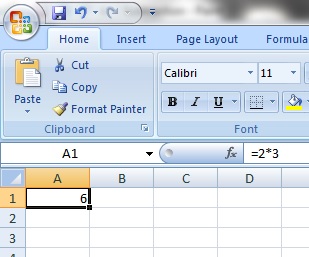
The formula would then appear in what we can call the ‘formula bar’, which appears just above all the cells.
Addition
Addition can be performed with the ‘+’ sign. So, if you wanted to add 1 to 2, you would type ‘=1+2’, as below.

Subtraction
Subtraction is performed with the ‘-‘ sign. So, if you wanted to subtract 3 from 8, you would type ‘=8-3‘.

Multiplication
Multiplication is performed with the ‘*’ sign. Nope, not the ‘x’, as you might have thought. Thus, to multiply 2 by 3, you would type ‘=2*3’.
Division
Division is performed with the ‘/’ sign. So, to divide 10 by 5, you would type ‘=10/5’.

Brackets
So, what if you wanted to perform a multiplication and then a division? Here, we use brackets, which help to isolate mathematical operations and as you will see later, logical expressions as well.
Behold, an expression where we multiply 2 by 3 and take the product and divide it by 6.

 excelpunks. Training - Consultancy - Solutions.
Leave a comment